Revenue Cloud
Implementing a scalable end-to-end CPQ experience
TL;DR
Role: Lead Product Designer on product configuration and quoting workflows
Team: 5 designers (independent work tracks), PMs, engineers
Timeline: 12+ months
Deliverables: MVP + enhanced release, user testing, dashboard UI, design system integration
Wins: 5/5 CSAT from execs, showcased at Cisco Live
Impact: Reduced quoting friction, improved sales team efficiency, set foundation for broader Salesforce integration
Challenge
Cisco needed to migrate from a legacy quoting system to Salesforce Revenue Cloud—but their workflows were too complex for an off-the-shelf implementation. Our job was to design a custom CPQ (configure, price, quote) experience that would unify siloed tools, streamline data flows, and reduce sales inefficiencies.
Role
As one of five designers, I led the design of Cisco’s product configuration and quoting workflows. I owned the UX strategy, interaction design, prototyping, and refinement for core features across both the MVP and enhanced release stages.
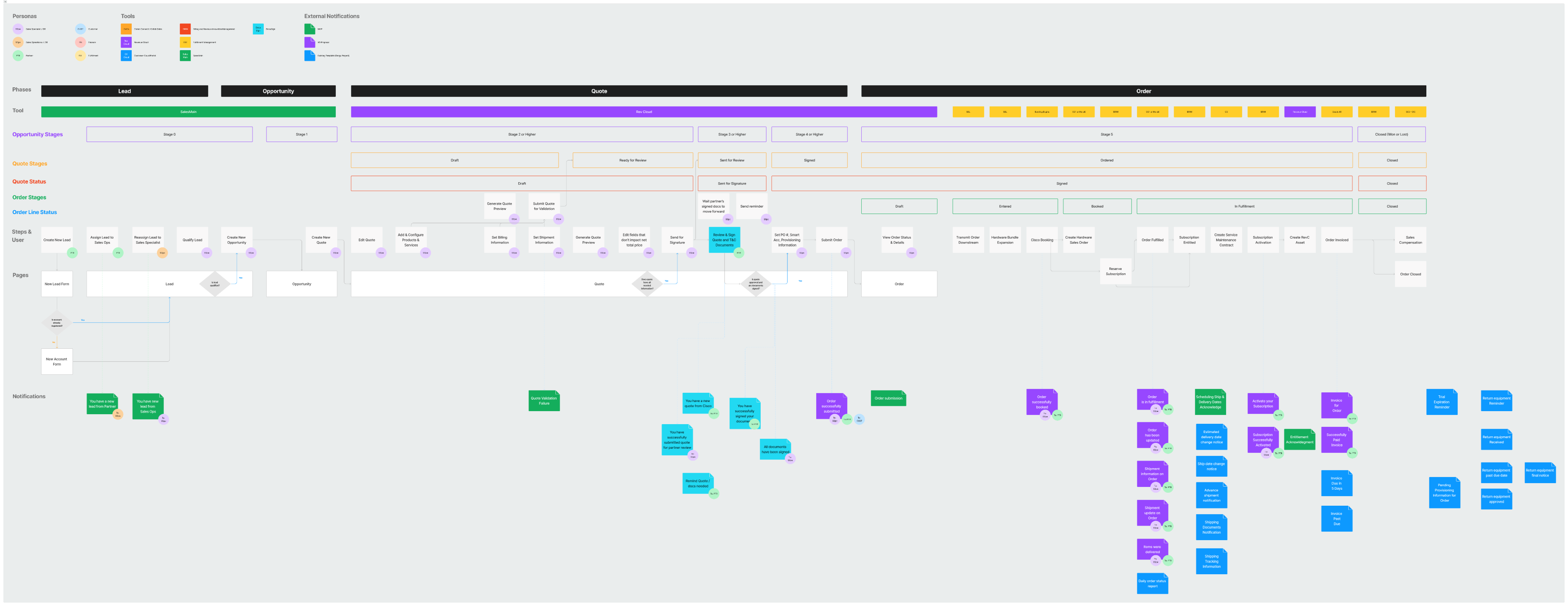
This collaborative journey map became the backbone of our strategy, helping two large orgs see the same complexity and agree on where to start.
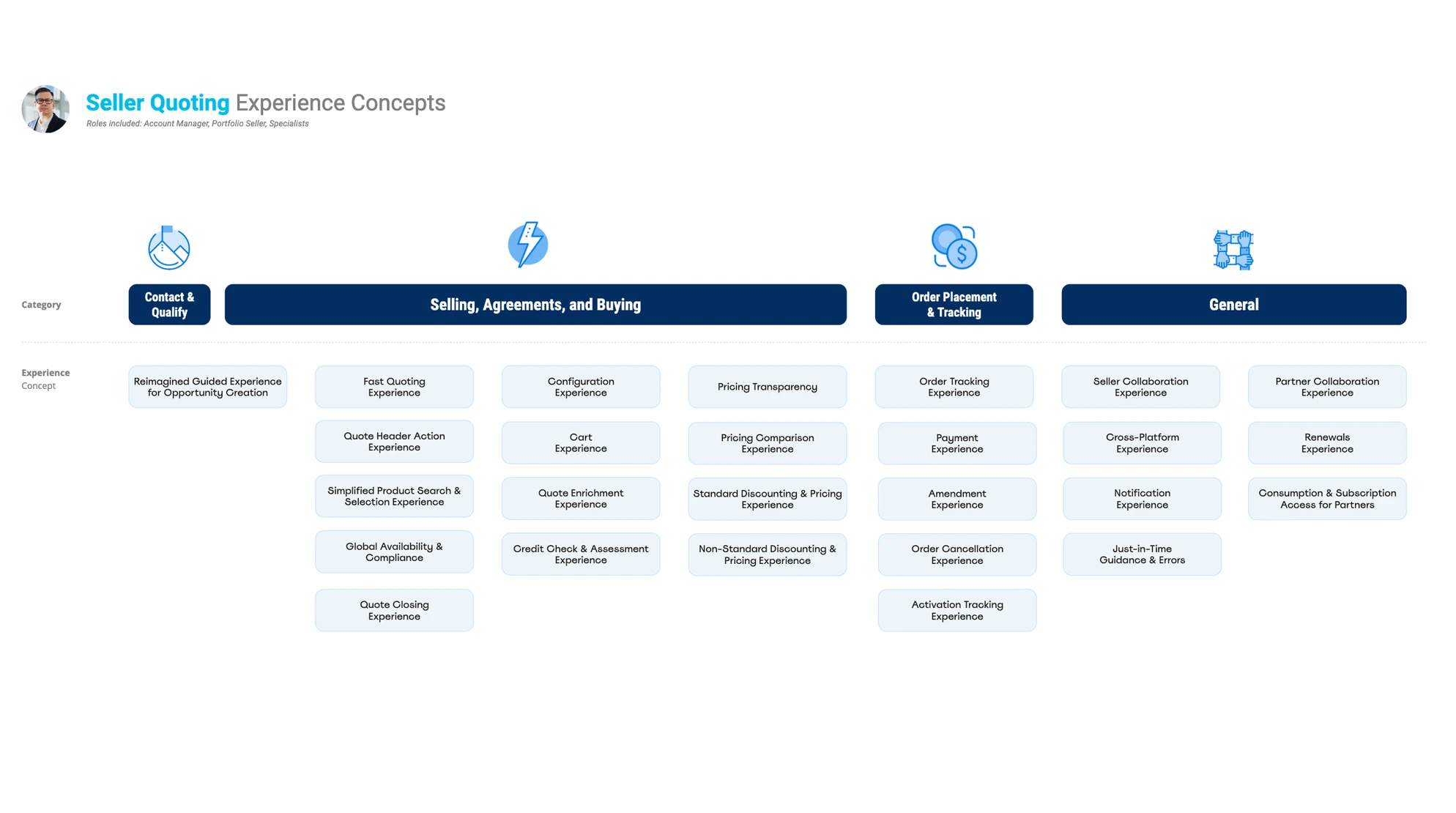
Breaking down the Seller’s workflow into functional and emotional jobs gave us a clearer lens on what really mattered — speed, confidence, and control.
Approach
I focused on two primary personas—Sellers and Sales Leads—and built workflows tailored to their needs:
- Sellers: Created tools for managing multiple in-progress quotes and moving from rough estimates to final proposals
- Sales Leads: Designed with visibility, forecasting, and coaching in mind
We structured the project in two phases:
- P0 (MVP): Launch essential UX quoting workflows using Salesforce Lightning with minimal UI customization
- P1: Expand functionality based on deeper user testing and adopt Cisco’s Atmosphere Design System
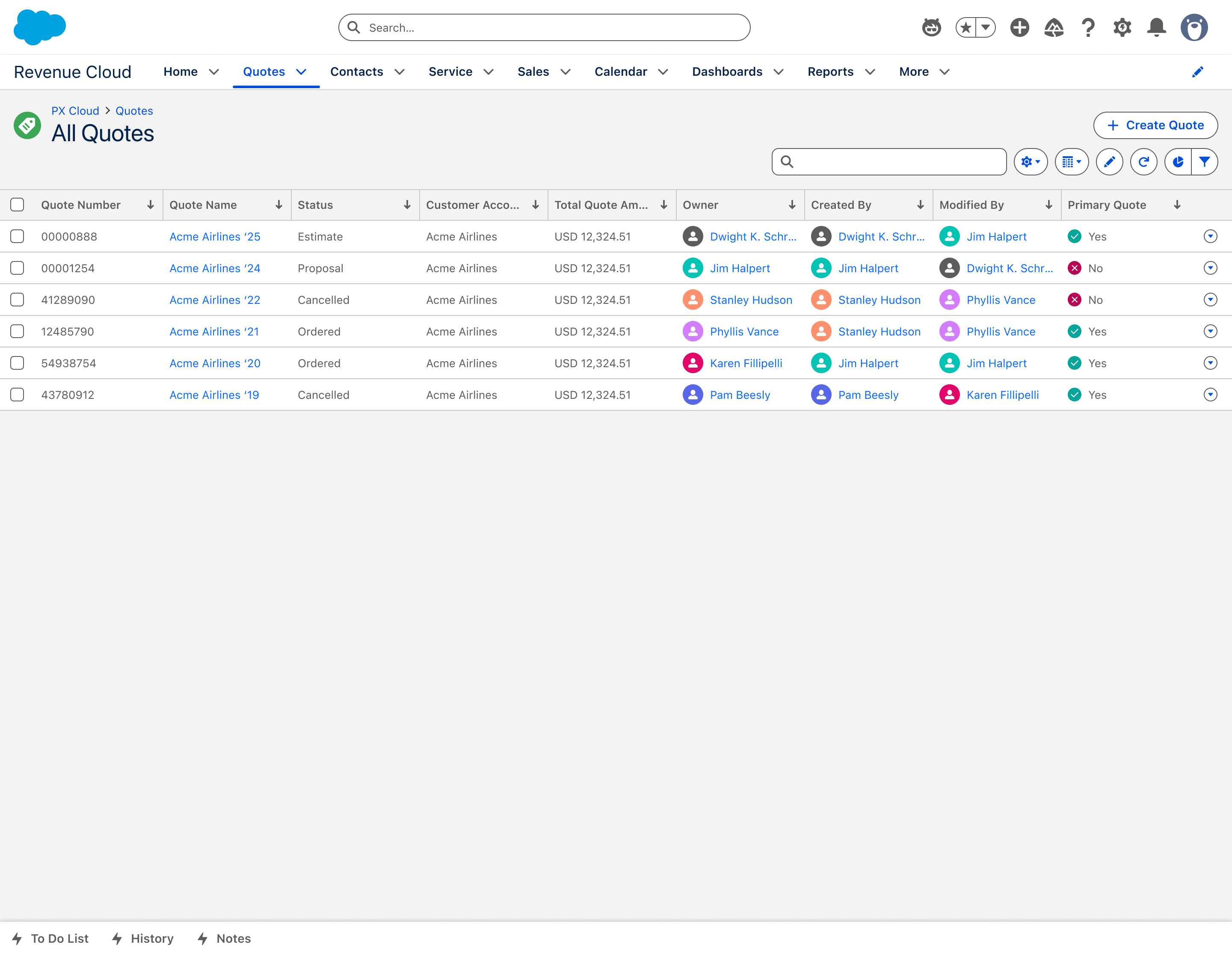
Not flashy, but effective — this early P0 view replaced spreadsheet chaos with a single source of truth for Sellers and Sales Leads.
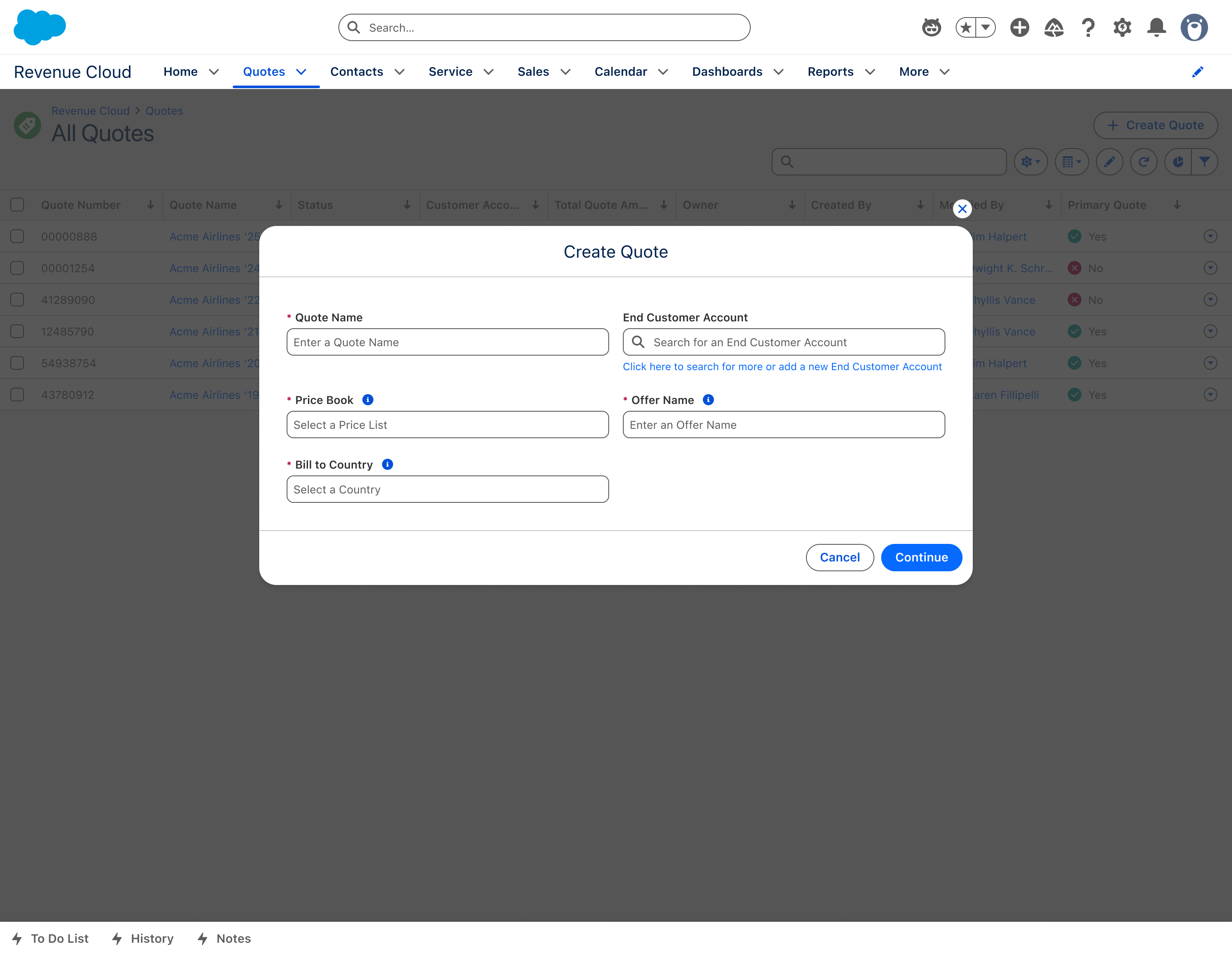
The ‘Create Quote’ modal launched from Salesforce but handed off to PX Cloud — a necessary split in P0, with plans to fully unify the flow in P1.
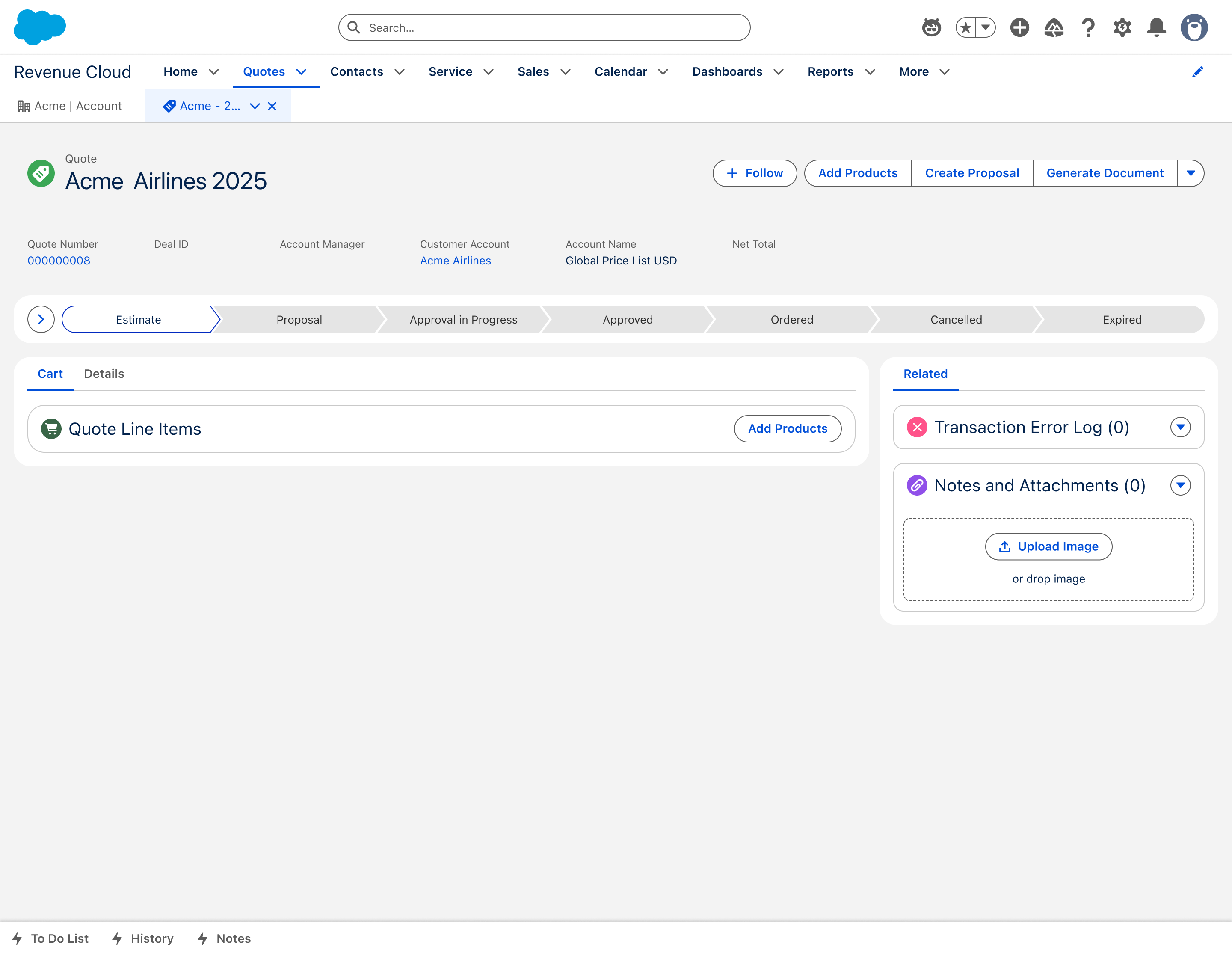
A minimal, out-of-the-box P0 quote view — just enough UI to test core functionality, validate flow logic, and start gathering user feedback.
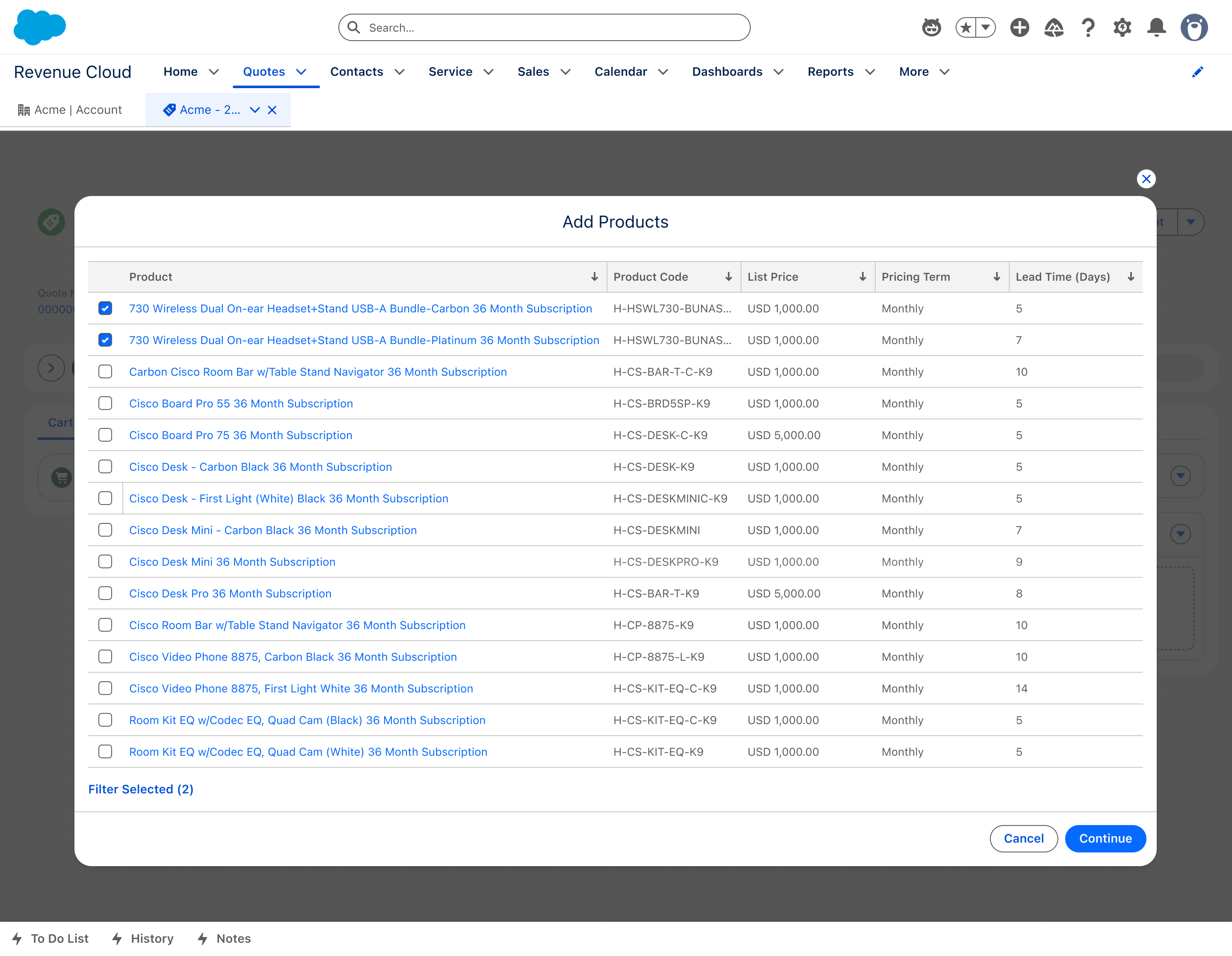
Product configuration was scoped for P1, so in P0, each variant appeared as a separate line item — a temporary but functional workaround.
Solution
Key features I led design on included:
- Quick Quote: A faster way for sellers to go from estimate to proposal
- Coaching Prompts: Inline nudges to help users advance their quotes without dropping the ball
- Quote Tracker Dashboard: Replaced legacy spreadsheets with a scalable dashboard UI showing quote status and progress
- Terminology Refinement: Based on usability feedback, I adjusted language and flow for better comprehension
Throughout both phases, I collaborated closely with dev teams and stakeholders to ensure feasibility and brand alignment.
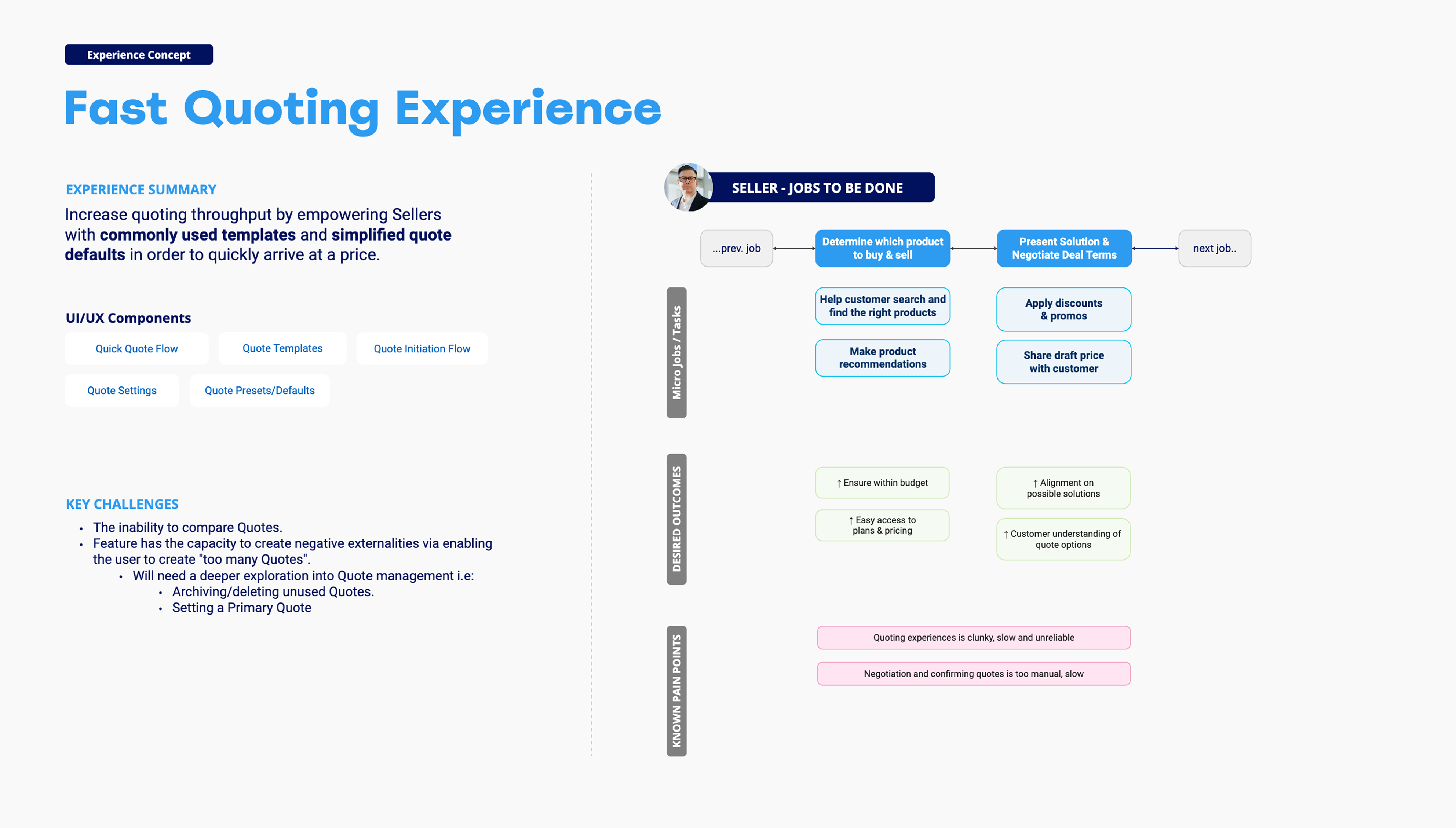
We revisited the Seller JTBD framework post-P0 to refocus P1 around speed, clarity, and confidence — not just quote completion.
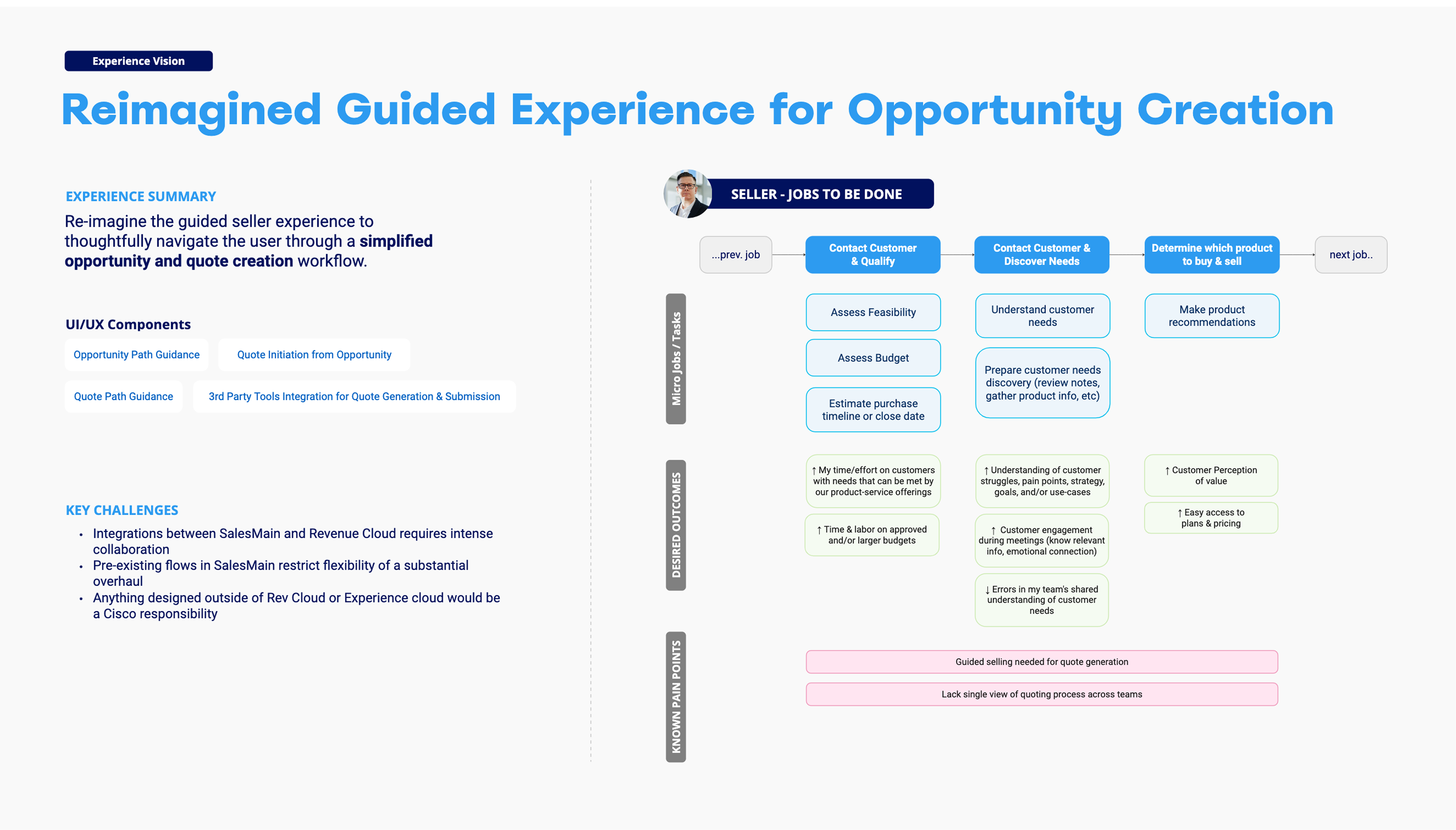
Sellers needed clarity, not guesswork. Our redesigned opportunity flow focused on reducing field bloat, guiding input, and minimizing second-guessing.
Impact
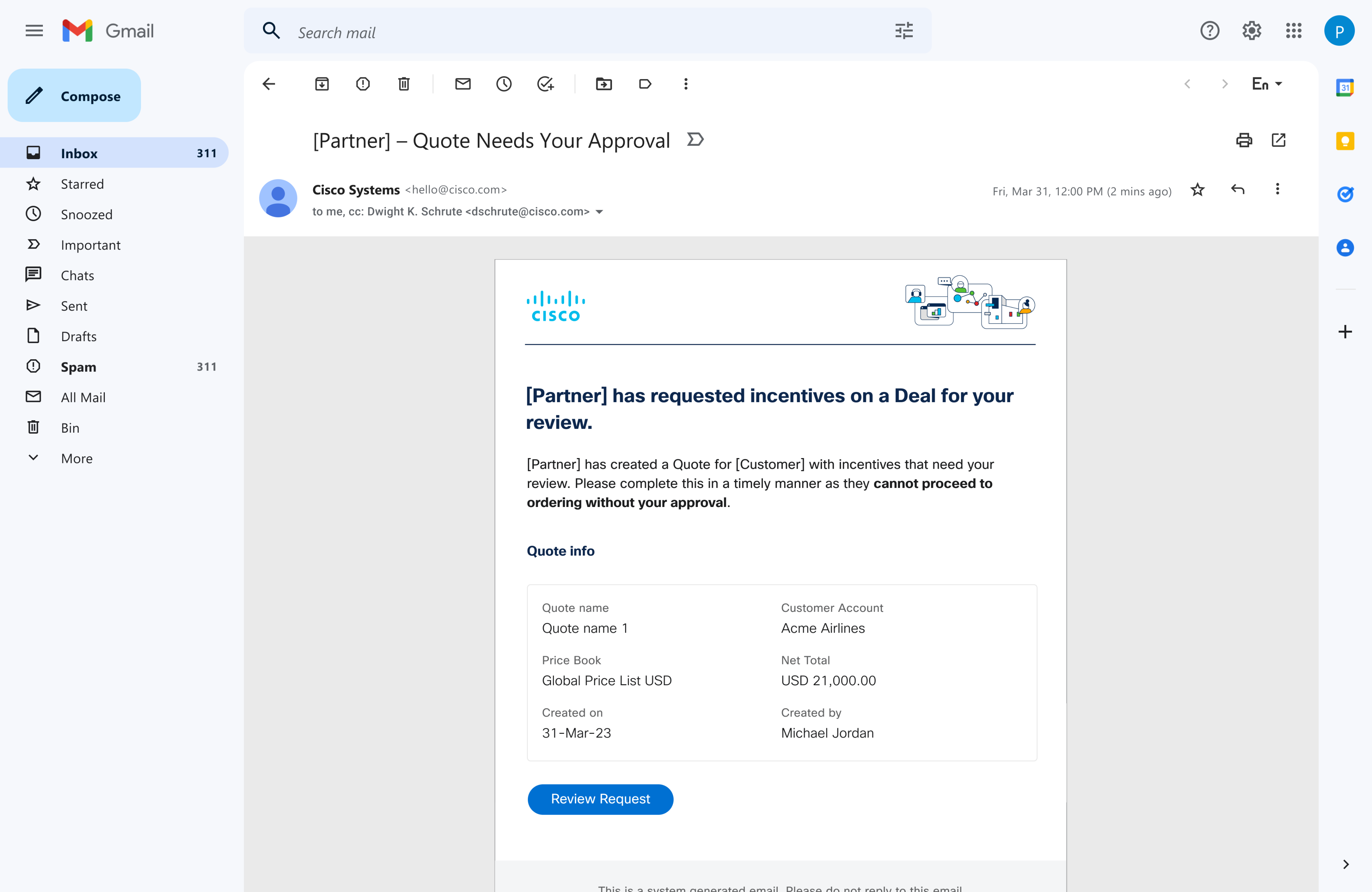
My designs improved speed, clarity, and usability in Cisco’s quoting flow—helping sales teams manage quotes more efficiently and reduce reliance on manual processes. The experience earned a perfect 5/5 CSAT from Cisco stakeholders and was showcased at Cisco Live.
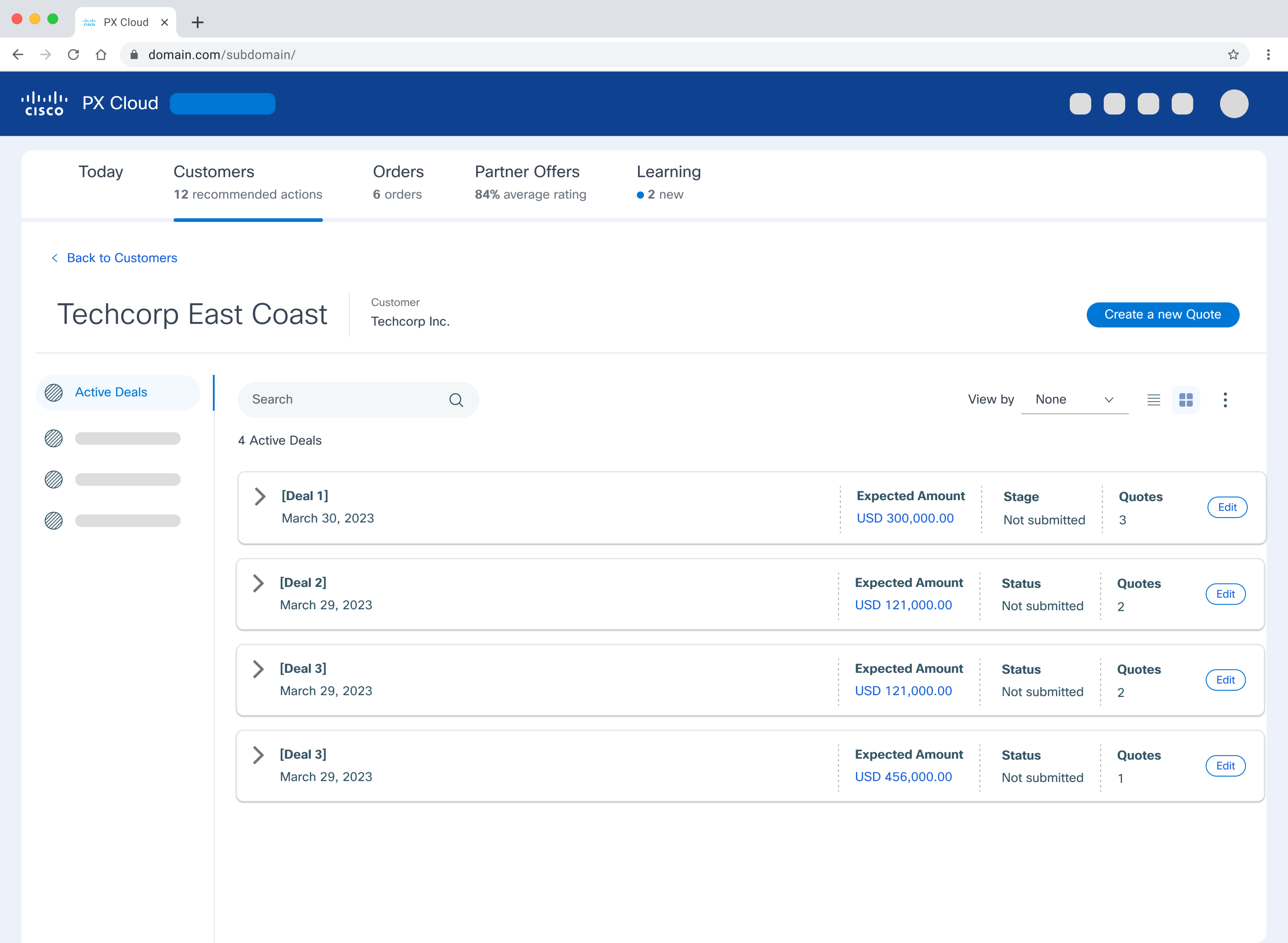
In P1, we evolved the quoting dashboard with Cisco-branded styling, account-level grouping, and a summary panel to surface key actions and activity at a glance.
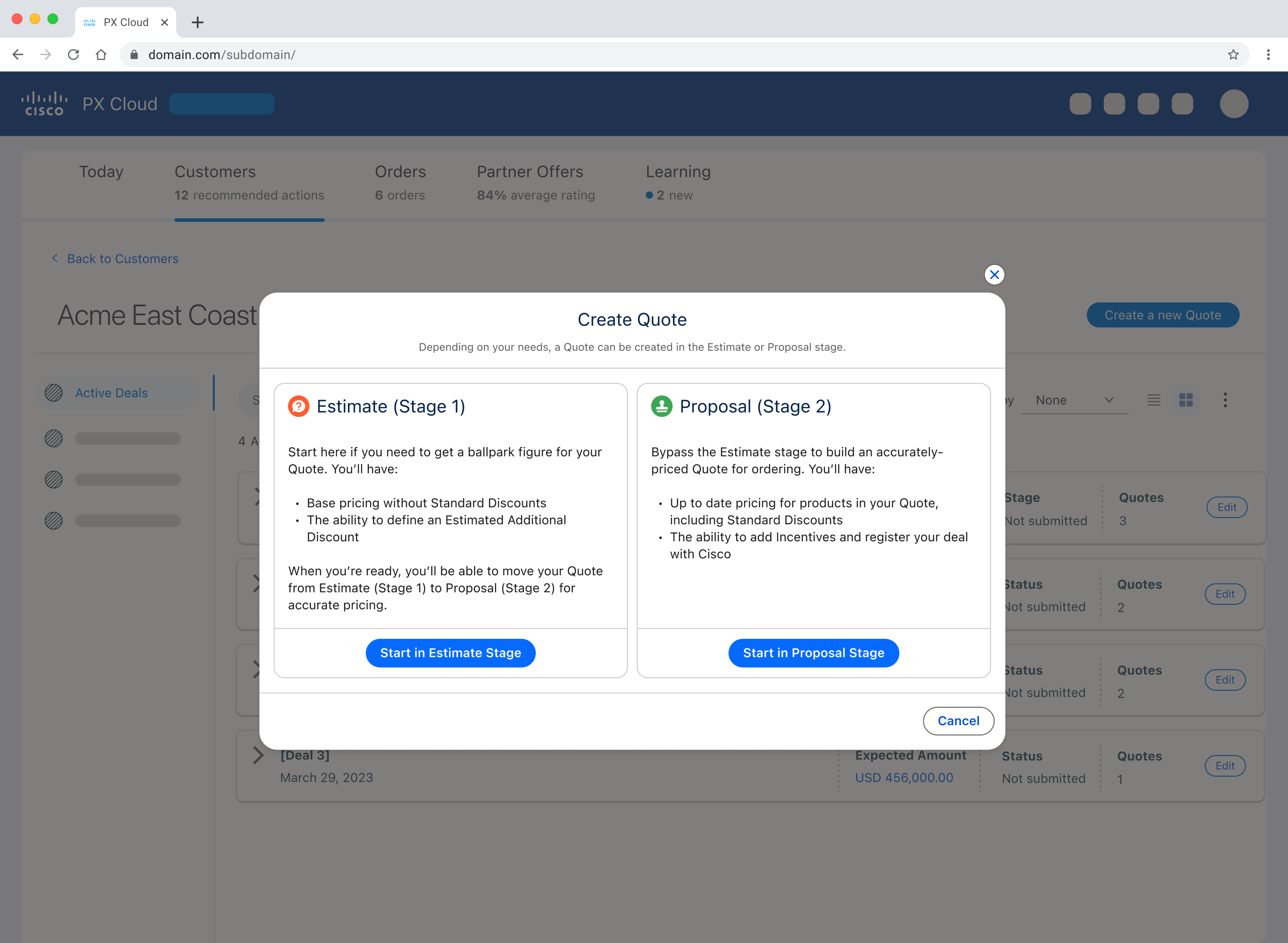
We introduced a quote type selector to let sellers choose between a full proposal or a quick estimate — giving them control based on deal complexity.
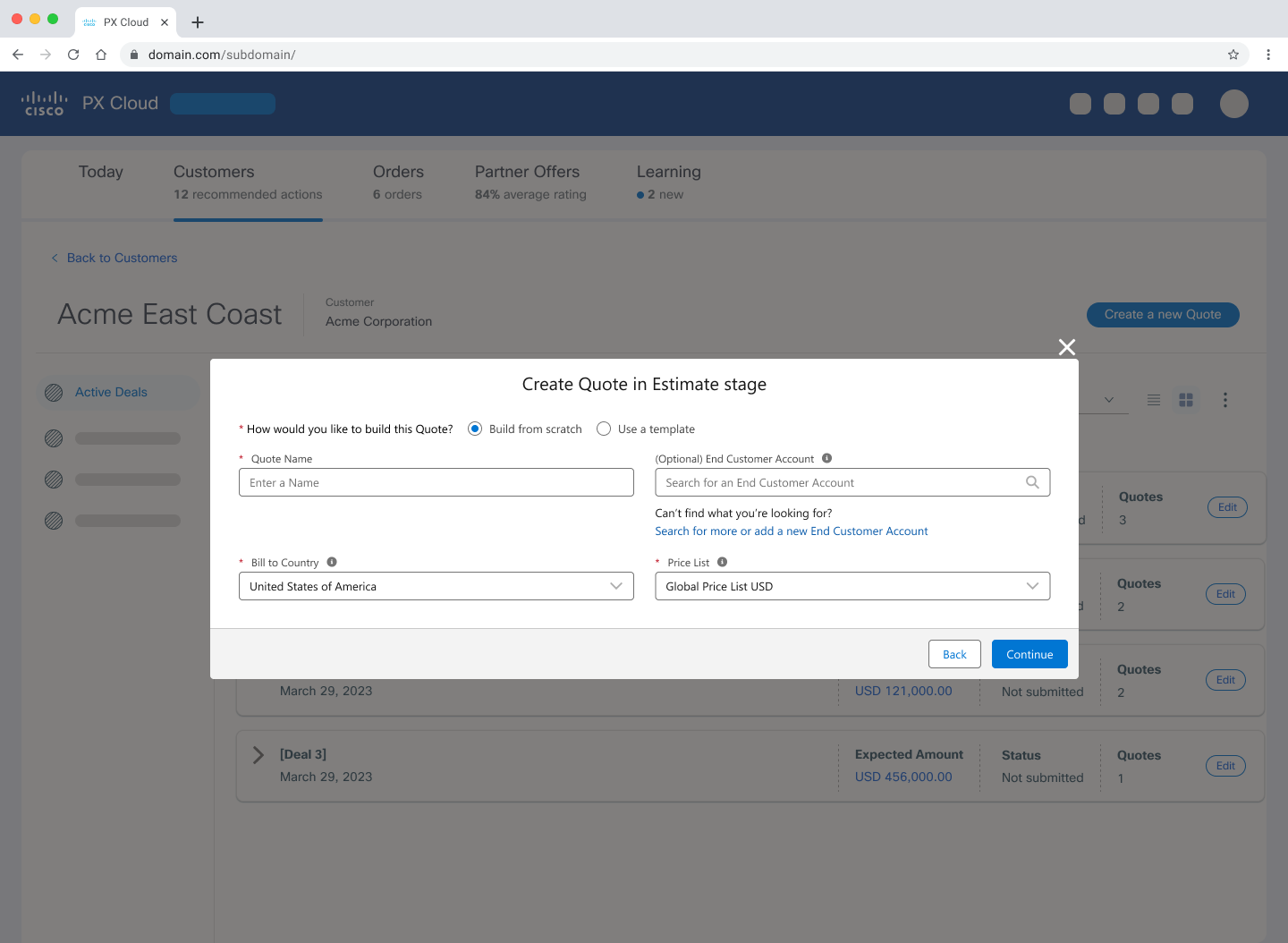
We streamlined quote setup to the essentials, enabling quick deal turnaround. Templates were planned for repeat use, but scoped out of P1.
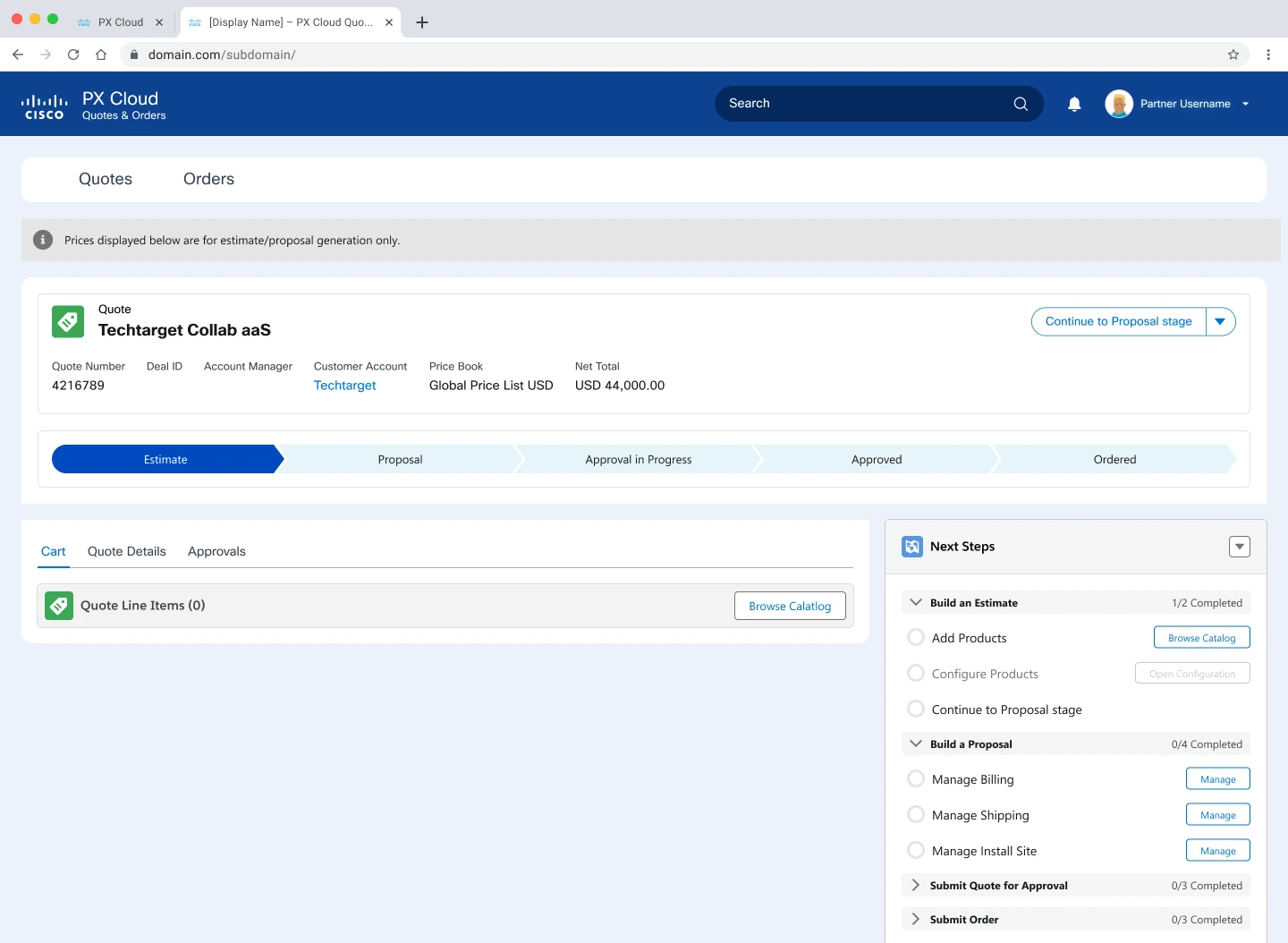
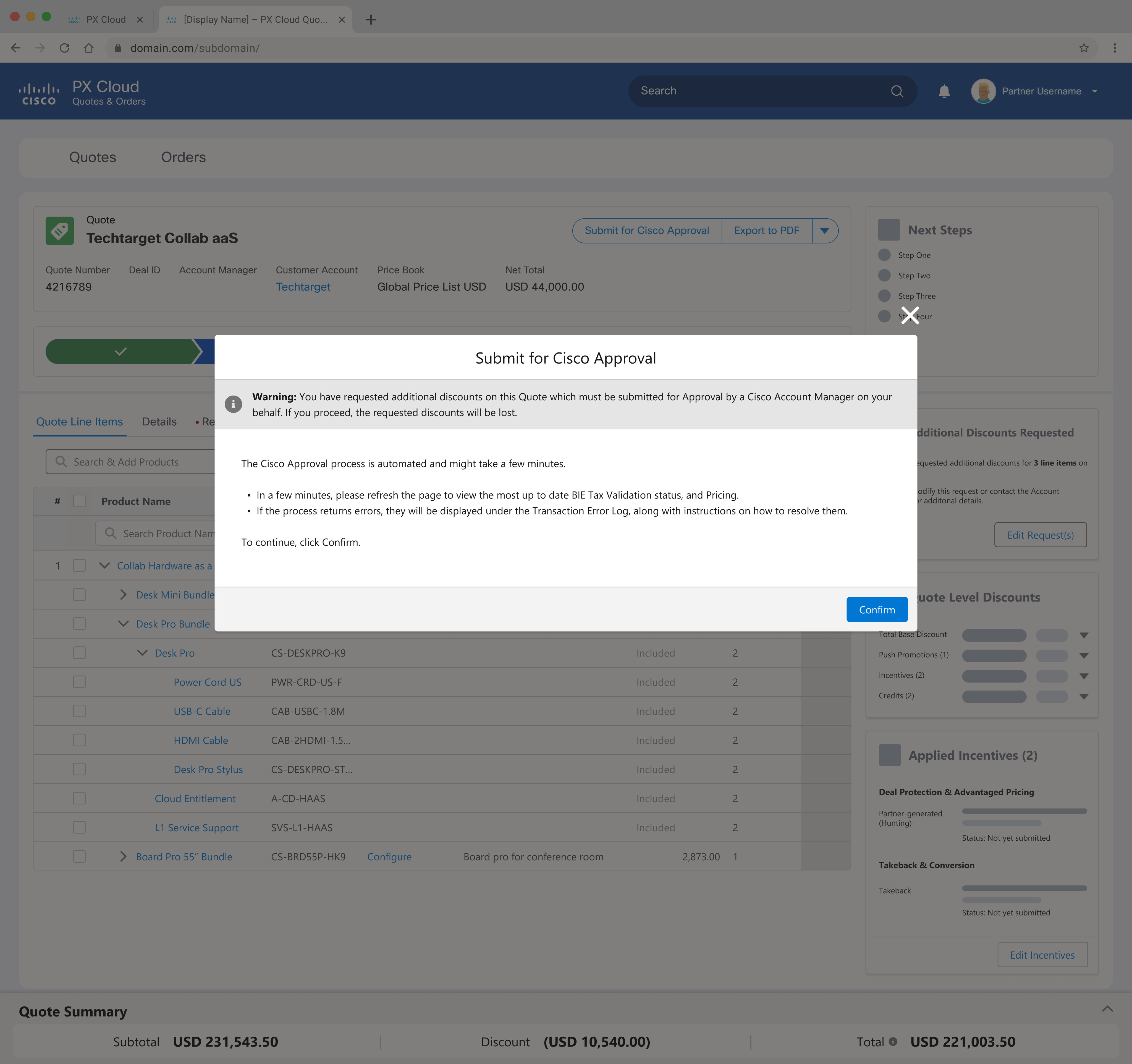
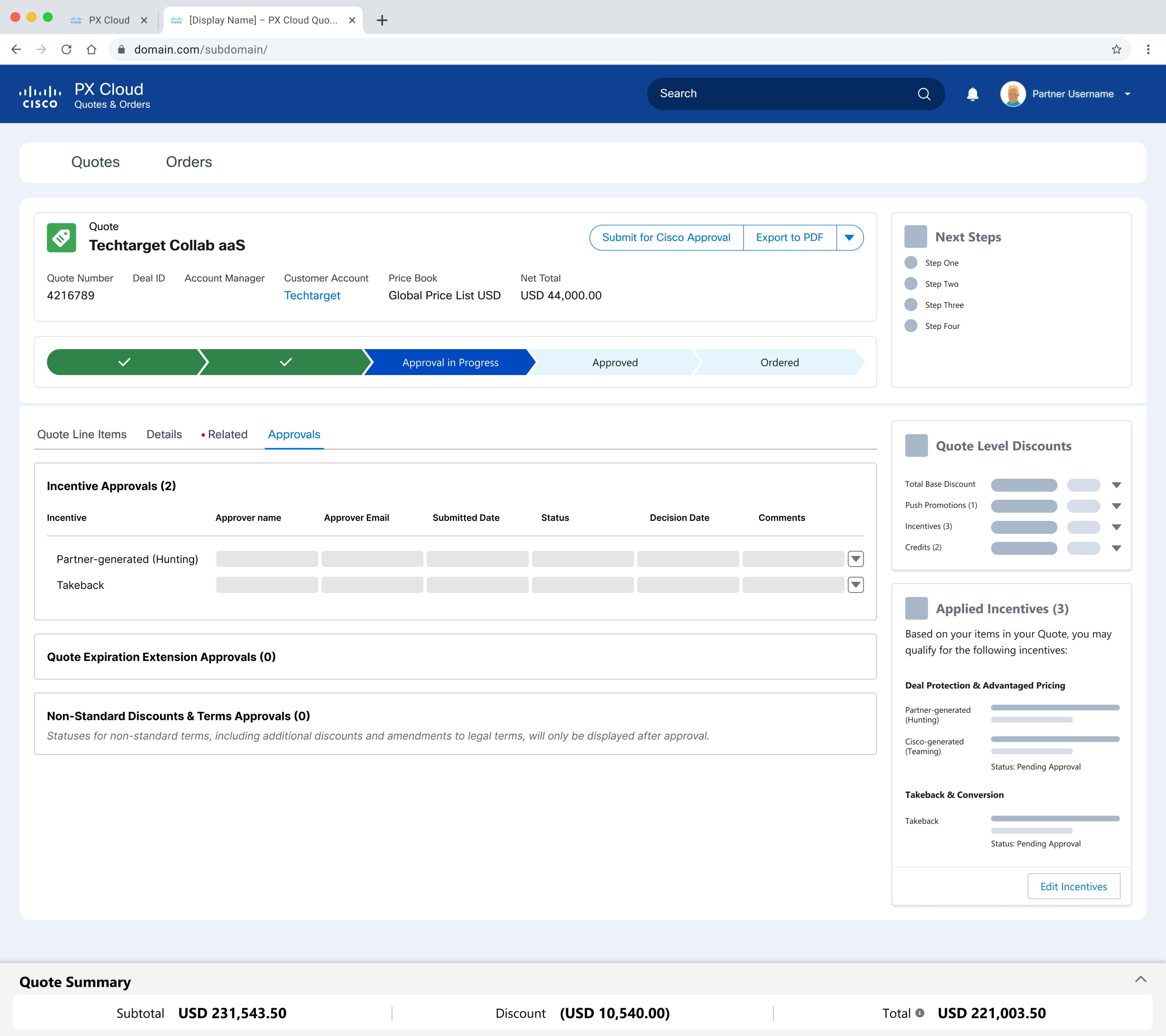
We introduced adaptive in-product guidance to help sellers stay on track — with deep links, stage visibility, and a collapsible layout for advanced users.
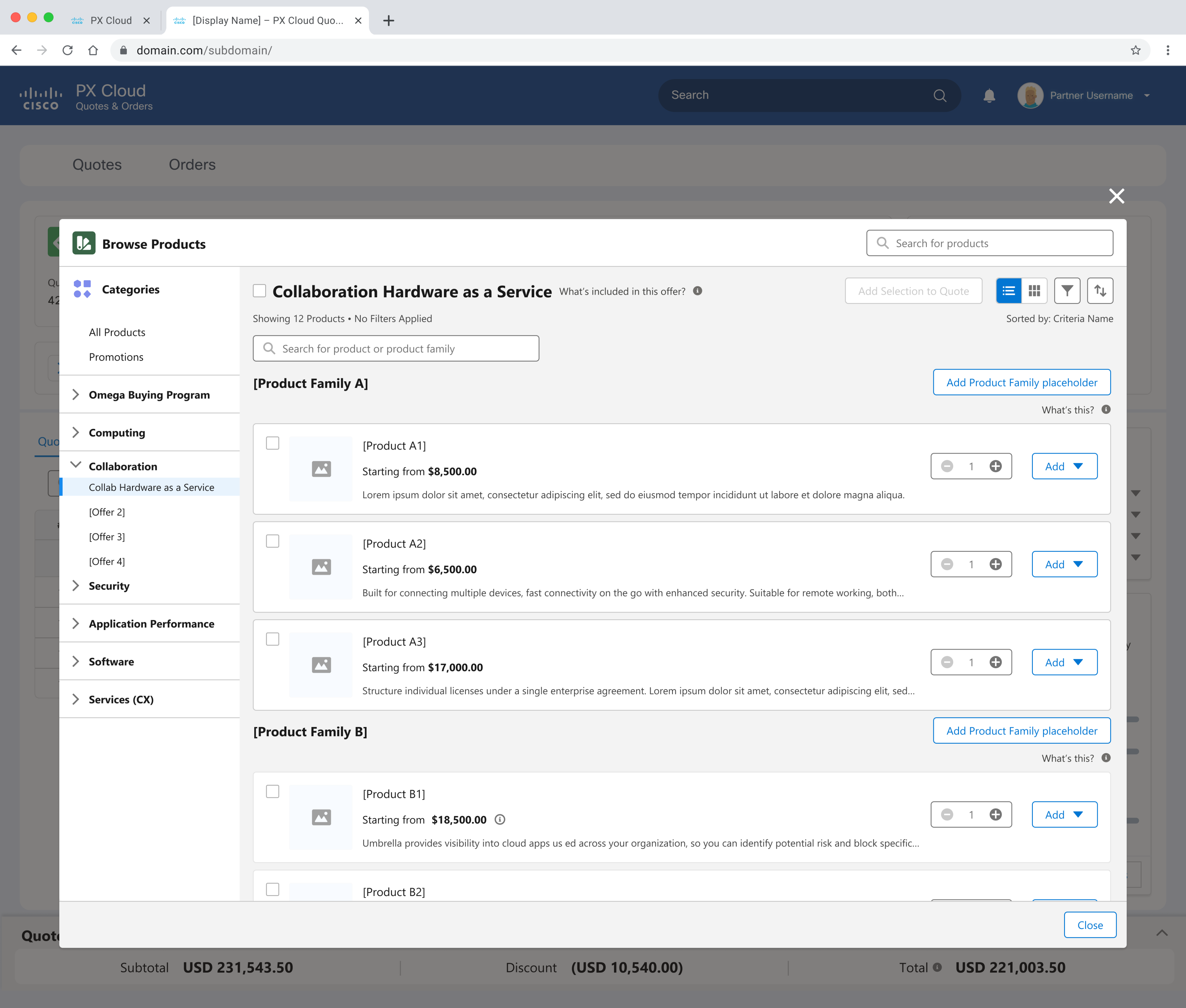
We replaced static SKUs with a dynamic, category-based catalog — adding visuals, guided configuration, and a more scalable way to support Cisco’s evolving product lineup.
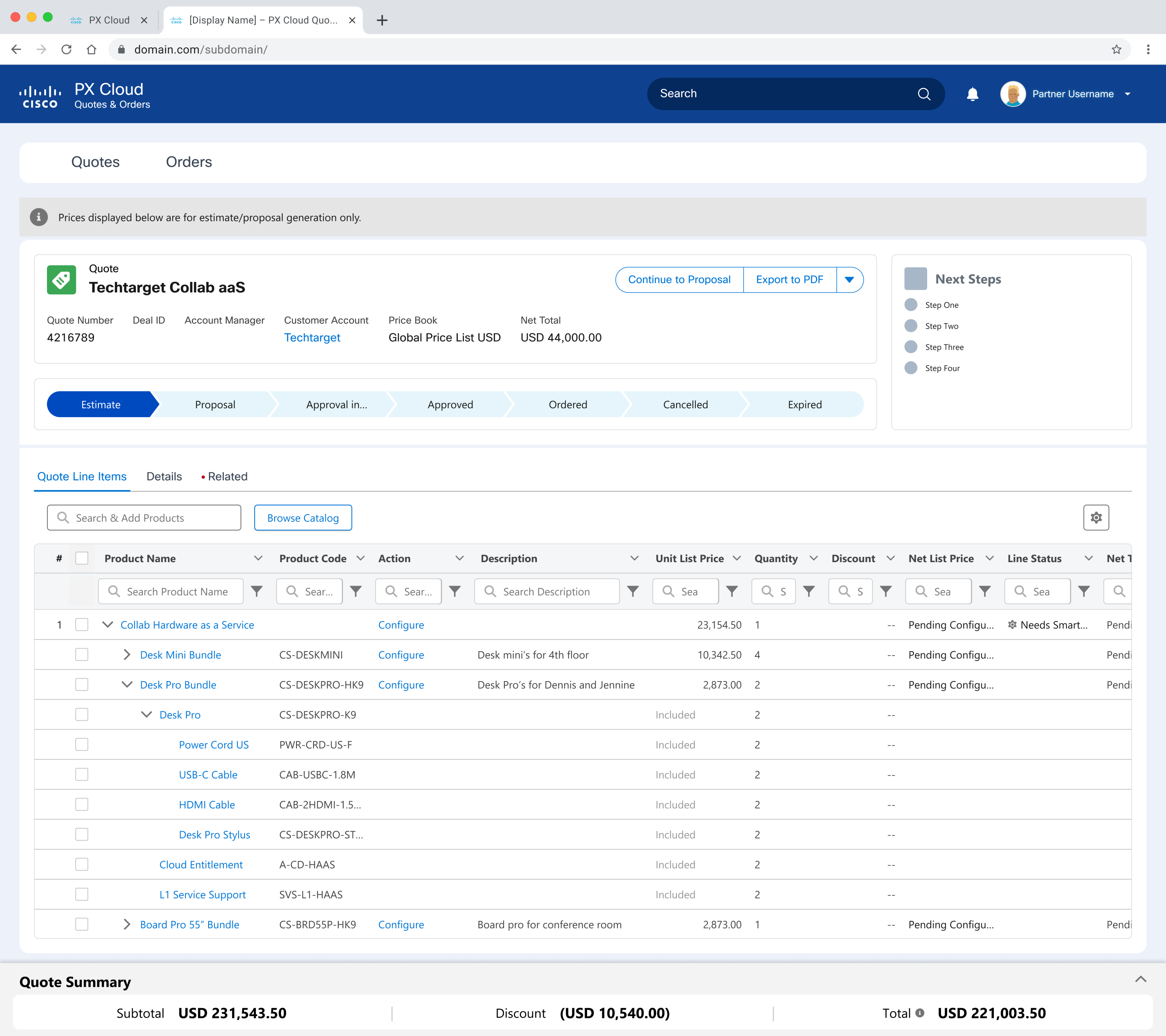
P1 added real-time product configuration — but UI constraints forced tradeoffs like dense tables and disconnected flows, which we used to inform future UX improvements.
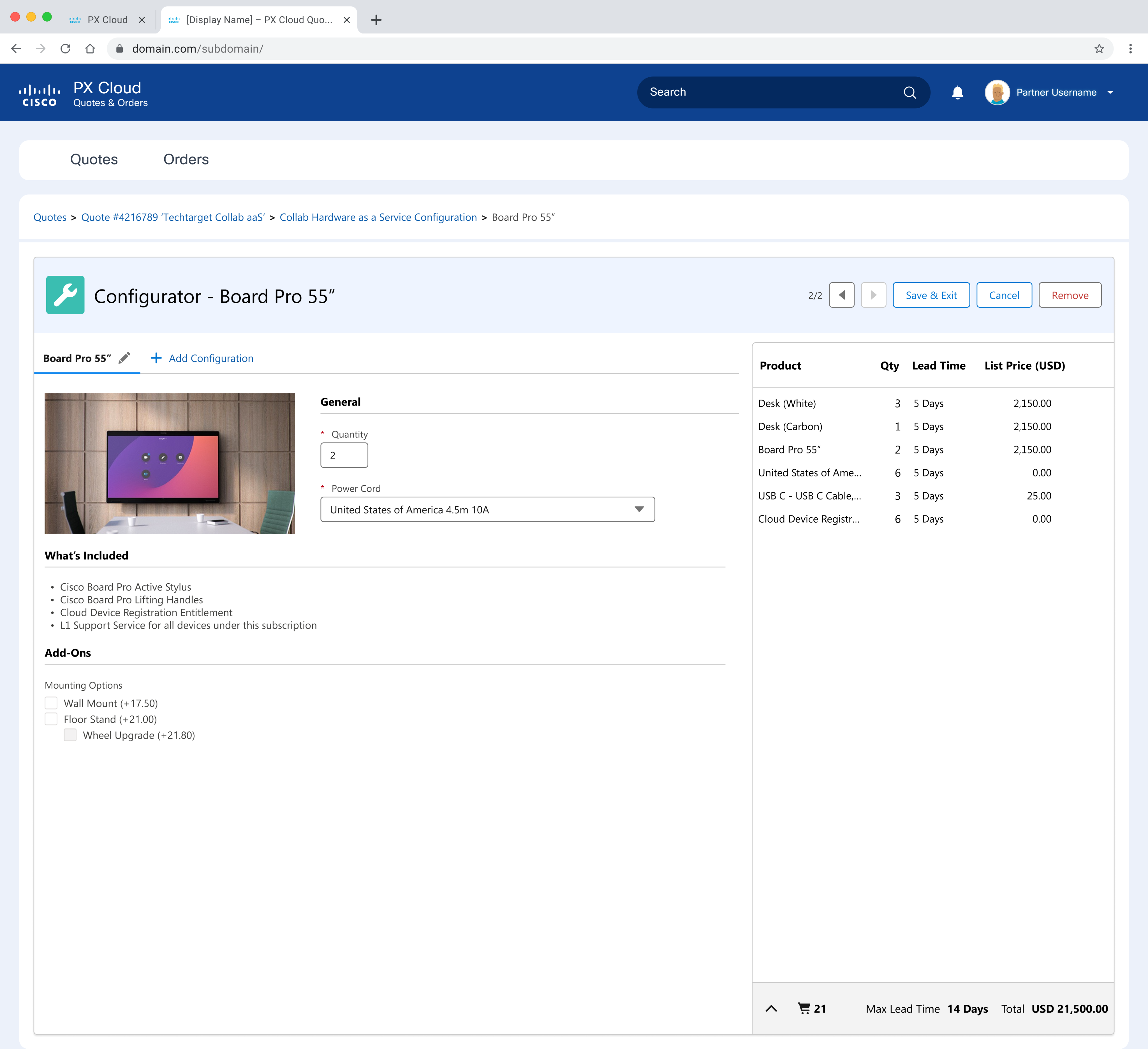
P1 introduced lightweight product configuration — enabling basic customization while laying the groundwork for more complex, rules-based flows in future phases.
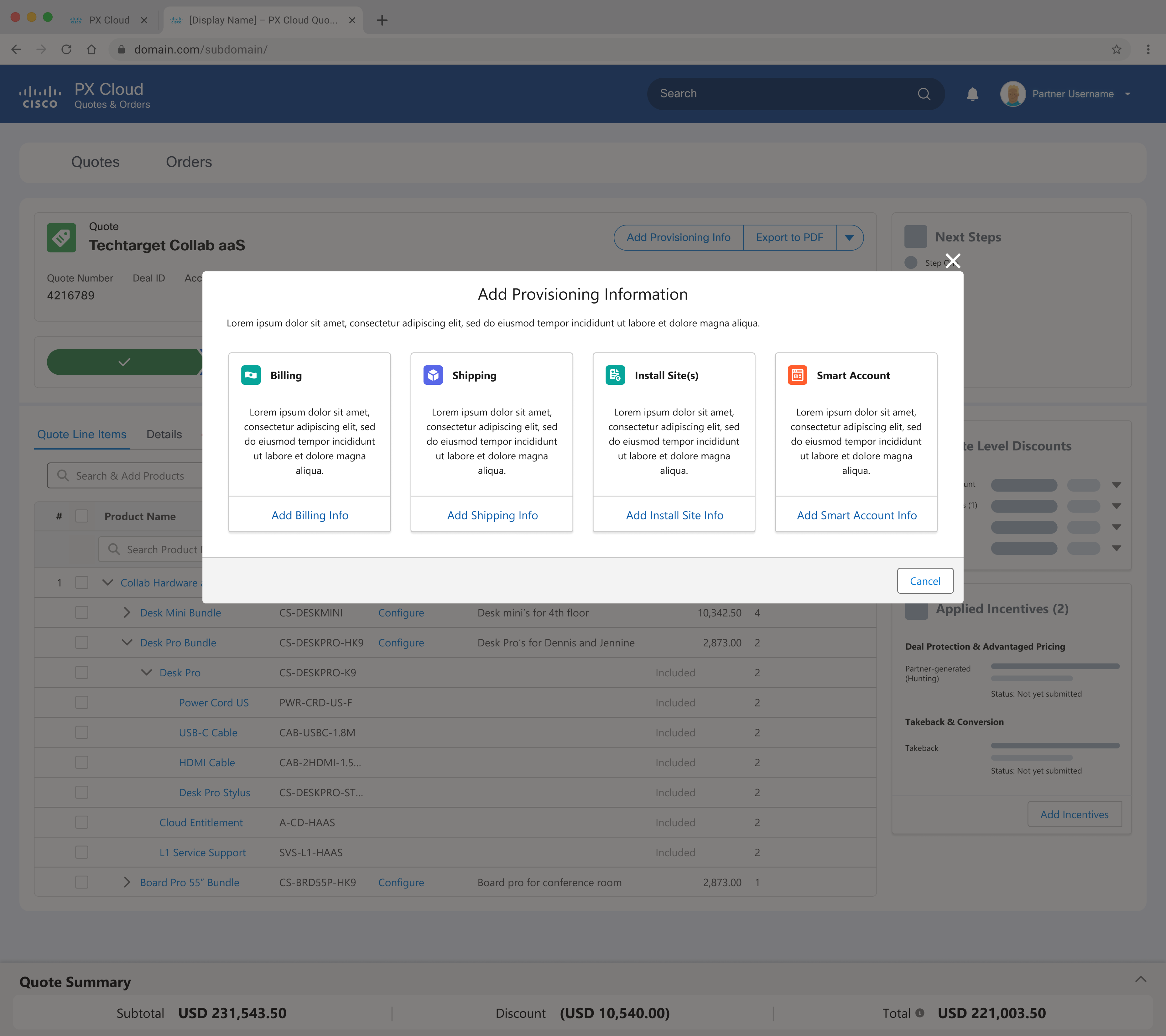
We replaced one massive form with modular provisioning tiles — letting sellers complete setup incrementally and reducing friction during fulfillment.
Results
- Achieved 5/5 CSAT from internal stakeholders, including the COO
- Showcased at Cisco Live to ~20,000 attendees
- Replaced fragmented quote workflows with a single Salesforce-native solution
- Established a foundation for full CPQ automation, including DocuSign and payment integrations
Reflection
- This project was a deep dive into enterprise-scale design within a complex ecosystem. The most rewarding challenge was balancing Salesforce’s rigid design system with Cisco’s vision—and delivering a product that delighted users while meeting business goals.
Revenue Cloud
Implementing a scalable end-to-end CPQ experience
TL;DR
Role: Lead Product Designer on product configuration and quoting workflows
Team: 5 designers (independent work tracks), PMs, engineers
Timeline: 12+ months
Deliverables: MVP + enhanced release, user testing, dashboard UI, design system integration
Wins: 5/5 CSAT from execs, showcased at Cisco Live
Impact: Reduced quoting friction, improved sales team efficiency, set foundation for broader Salesforce integration
Challenge
Cisco needed to migrate from a legacy quoting system to Salesforce Revenue Cloud—but their workflows were too complex for an off-the-shelf implementation. Our job was to design a custom CPQ (configure, price, quote) experience that would unify siloed tools, streamline data flows, and reduce sales inefficiencies.
Role
As one of five designers, I led the design of Cisco’s product configuration and quoting workflows. I owned the UX strategy, interaction design, prototyping, and refinement for core features across both the MVP and enhanced release stages.
This collaborative journey map became the backbone of our strategy, helping two large orgs see the same complexity and agree on where to start.
Breaking down the Seller’s workflow into functional and emotional jobs gave us a clearer lens on what really mattered — speed, confidence, and control.
Approach
I focused on two primary personas—Sellers and Sales Leads—and built workflows tailored to their needs:
- Sellers: Created tools for managing multiple in-progress quotes and moving from rough estimates to final proposals
- Sales Leads: Designed with visibility, forecasting, and coaching in mind
We structured the project in two phases:
- P0 (MVP): Launch essential UX quoting workflows using Salesforce Lightning with minimal UI customization
- P1: Expand functionality based on deeper user testing and adopt Cisco’s Atmosphere Design System
Not flashy, but effective — this early P0 view replaced spreadsheet chaos with a single source of truth for Sellers and Sales Leads.
The ‘Create Quote’ modal launched from Salesforce but handed off to PX Cloud — a necessary split in P0, with plans to fully unify the flow in P1.
A minimal, out-of-the-box P0 quote view — just enough UI to test core functionality, validate flow logic, and start gathering user feedback.
Product configuration was scoped for P1, so in P0, each variant appeared as a separate line item — a temporary but functional workaround.
Solution
Key features I led design on included:
- Quick Quote: A faster way for sellers to go from estimate to proposal
- Coaching Prompts: Inline nudges to help users advance their quotes without dropping the ball
- Quote Tracker Dashboard: Replaced legacy spreadsheets with a scalable dashboard UI showing quote status and progress
- Terminology Refinement: Based on usability feedback, I adjusted language and flow for better comprehension
Throughout both phases, I collaborated closely with dev teams and stakeholders to ensure feasibility and brand alignment.
We revisited the Seller JTBD framework post-P0 to refocus P1 around speed, clarity, and confidence — not just quote completion.
Sellers needed clarity, not guesswork. Our redesigned opportunity flow focused on reducing field bloat, guiding input, and minimizing second-guessing.
Impact
My designs improved speed, clarity, and usability in Cisco’s quoting flow—helping sales teams manage quotes more efficiently and reduce reliance on manual processes. The experience earned a perfect 5/5 CSAT from Cisco stakeholders and was showcased at Cisco Live.
In P1, we evolved the quoting dashboard with Cisco-branded styling, account-level grouping, and a summary panel to surface key actions and activity at a glance.
We introduced a quote type selector to let sellers choose between a full proposal or a quick estimate — giving them control based on deal complexity.
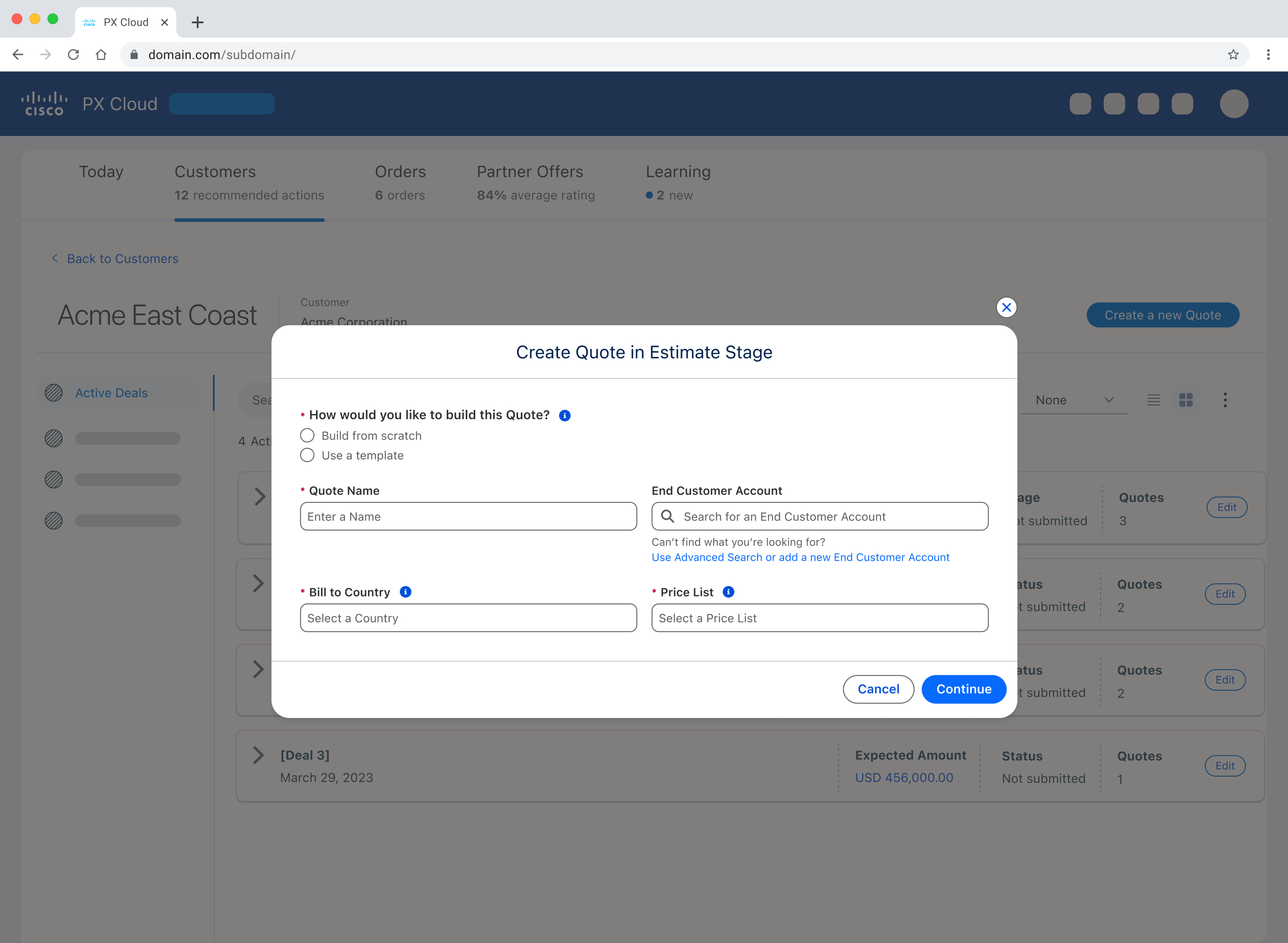
We streamlined quote setup to the essentials, enabling quick deal turnaround. Templates were planned for repeat use, but scoped out of P1.
We introduced adaptive in-product guidance to help sellers stay on track — with deep links, stage visibility, and a collapsible layout for advanced users.
We replaced static SKUs with a dynamic, category-based catalog — adding visuals, guided configuration, and a more scalable way to support Cisco’s evolving product lineup.
P1 added real-time product configuration — but UI constraints forced tradeoffs like dense tables and disconnected flows, which we used to inform future UX improvements.
P1 introduced lightweight product configuration — enabling basic customization while laying the groundwork for more complex, rules-based flows in future phases.
We replaced one massive form with modular provisioning tiles — letting sellers complete setup incrementally and reducing friction during fulfillment.
Results
- Achieved 5/5 CSAT from internal stakeholders, including the COO
- Showcased at Cisco Live to ~20,000 attendees
- Replaced fragmented quote workflows with a single Salesforce-native solution
- Established a foundation for full CPQ automation, including DocuSign and payment integrations
Reflection
- This project was a deep dive into enterprise-scale design within a complex ecosystem. The most rewarding challenge was balancing Salesforce’s rigid design system with Cisco’s vision—and delivering a product that delighted users while meeting business goals.